
AI Search
Classic Search
 Search Phrase:
 Search Type:
Advanced search options
 Search in Forums:
 Search in date period:

 Sort Search Results by:

AI Assistant
Notifications
Clear all

[Closed] how to remove "Subscribe For new topics" feature?

10 Posts
3 Users
0 Reactions
2,845 Views
Posts: 8
Topic starter
Translate
English
Spanish
French
German
Italian
Portuguese
Russian
Chinese
Japanese
Korean
Arabic
Hindi
Dutch
Polish
Turkish
Vietnamese
Thai
Swedish
Danish
Finnish
Norwegian
Czech
Hungarian
Romanian
Greek
Hebrew
Indonesian
Malay
Ukrainian
Bulgarian
Croatian
Slovak
Slovenian
Serbian
Lithuanian
Latvian
Estonian
(@bbbos)
Active Member
Joined: 6 years ago
[#15128]

Hi guys, we have pretty large forum, and a lot of automated emails are getting sent. We think it is because most people have subscribed to new topics or to get email notifications when someone answers on a post.  How do we remove the Subscribe for Email Notification feature?  Can you suggest please?

Screen Shot 2020 11 11 at 11.37.47 AM

9 Replies
Posts: 8
Topic starter
Translate
English
Spanish
French
German
Italian
Portuguese
Russian
Chinese
Japanese
Korean
Arabic
Hindi
Dutch
Polish
Turkish
Vietnamese
Thai
Swedish
Danish
Finnish
Norwegian
Czech
Hungarian
Romanian
Greek
Hebrew
Indonesian
Malay
Ukrainian
Bulgarian
Croatian
Slovak
Slovenian
Serbian
Lithuanian
Latvian
Estonian
(@bbbos)
Active Member
Joined: 6 years ago

we need this coding solution. can you provide please?

https://wpforo.com/community/postid/44112/


Robert
Posts: 10733
Admin
Translate
English
Spanish
French
German
Italian
Portuguese
Russian
Chinese
Japanese
Korean
Arabic
Hindi
Dutch
Polish
Turkish
Vietnamese
Thai
Swedish
Danish
Finnish
Norwegian
Czech
Hungarian
Romanian
Greek
Hebrew
Indonesian
Malay
Ukrainian
Bulgarian
Croatian
Slovak
Slovenian
Serbian
Lithuanian
Latvian
Estonian
(@robert)
Support Team
Joined: 2 months ago

Hi @bbbos,

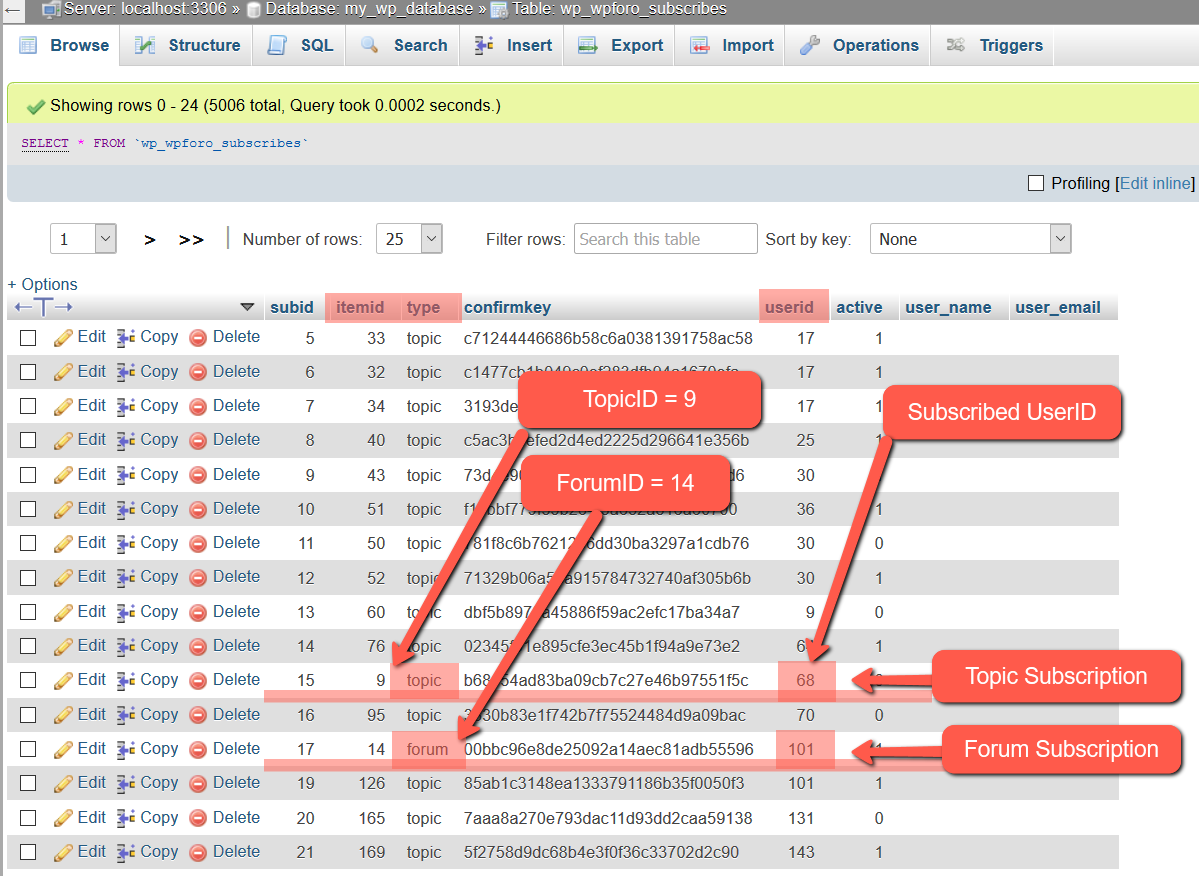
You can manage users subscriptions one by one in each user Profile > Subscriptions Tab. There is a subscription manager in Subscriptions Tab, just uncheck all and save for certain user:


If you need to remove multiple subscriptions at once, you can remove entries from wp_wpforo_subscriptions table in the database. Use phpMyAdmin plugin or your Hosting Service > cPanel > phpMyAdmin Tool, go to website database, find the wp_wpforo_subscriptions table and remove rows you want. This table contains UserID <> TopicID or UserID <>ForumID relations. So you can remove subscriptions by UserID, TopicID or ForumID.


7 Replies
Robert
Admin
(@robert)
Joined: 2 months ago

Support Team
Posts: 10733
Translate
English
Spanish
French
German
Italian
Portuguese
Russian
Chinese
Japanese
Korean
Arabic
Hindi
Dutch
Polish
Turkish
Vietnamese
Thai
Swedish
Danish
Finnish
Norwegian
Czech
Hungarian
Romanian
Greek
Hebrew
Indonesian
Malay
Ukrainian
Bulgarian
Croatian
Slovak
Slovenian
Serbian
Lithuanian
Latvian
Estonian

Finding certain Topic ID:


Finding certain Forum ID:


(@bbbos)
Joined: 6 years ago

Active Member
Posts: 8
Translate
English
Spanish
French
German
Italian
Portuguese
Russian
Chinese
Japanese
Korean
Arabic
Hindi
Dutch
Polish
Turkish
Vietnamese
Thai
Swedish
Danish
Finnish
Norwegian
Czech
Hungarian
Romanian
Greek
Hebrew
Indonesian
Malay
Ukrainian
Bulgarian
Croatian
Slovak
Slovenian
Serbian
Lithuanian
Latvian
Estonian

@robert thank you.
can we delete all of them and leave folder wp_wpforo_subscribes empty?


Robert
Admin
(@robert)
Joined: 2 months ago

Support Team
Posts: 10733
Robert
Translate
English
Spanish
French
German
Italian
Portuguese
Russian
Chinese
Japanese
Korean
Arabic
Hindi
Dutch
Polish
Turkish
Vietnamese
Thai
Swedish
Danish
Finnish
Norwegian
Czech
Hungarian
Romanian
Greek
Hebrew
Indonesian
Malay
Ukrainian
Bulgarian
Croatian
Slovak
Slovenian
Serbian
Lithuanian
Latvian
Estonian

@bbbos,

Yes, just use the [Empty] link of the wp_wpforo_subscriptions table on table list.


(@bbbos)
Joined: 6 years ago

Active Member
Posts: 8
Robert
Translate
English
Spanish
French
German
Italian
Portuguese
Russian
Chinese
Japanese
Korean
Arabic
Hindi
Dutch
Polish
Turkish
Vietnamese
Thai
Swedish
Danish
Finnish
Norwegian
Czech
Hungarian
Romanian
Greek
Hebrew
Indonesian
Malay
Ukrainian
Bulgarian
Croatian
Slovak
Slovenian
Serbian
Lithuanian
Latvian
Estonian

@robert thank you.

can you suggest how to turn inactive to active members?


Alvina
Moderator
(@alvina)
Joined: 7 years ago

Member
Posts: 1857
Robert
Robert
Translate
English
Spanish
French
German
Italian
Portuguese
Russian
Chinese
Japanese
Korean
Arabic
Hindi
Dutch
Polish
Turkish
Vietnamese
Thai
Swedish
Danish
Finnish
Norwegian
Czech
Hungarian
Romanian
Greek
Hebrew
Indonesian
Malay
Ukrainian
Bulgarian
Croatian
Slovak
Slovenian
Serbian
Lithuanian
Latvian
Estonian

@bbbos,

To display inactive users please follow to the 1.7.4 version release instruction and add the according Hook Code:  https://wpforo.com/community/wpforo-announcements/wpforo-1-7-3-is-released/

Related topic: https://wpforo.com/community/how-to-and-troubleshooting-2/forum-statistics-2/#post-41892


(@bbbos)
Joined: 6 years ago

Active Member
Posts: 8
Robert
Robert
Translate
English
Spanish
French
German
Italian
Portuguese
Russian
Chinese
Japanese
Korean
Arabic
Hindi
Dutch
Polish
Turkish
Vietnamese
Thai
Swedish
Danish
Finnish
Norwegian
Czech
Hungarian
Romanian
Greek
Hebrew
Indonesian
Malay
Ukrainian
Bulgarian
Croatian
Slovak
Slovenian
Serbian
Lithuanian
Latvian
Estonian

@alvina thanks! is there a function that allows me to email inactive users so that they can finish registration process?


Alvina
Moderator
(@alvina)
Joined: 7 years ago

Member
Posts: 1857
Alvina
Robert
Robert
Translate
English
Spanish
French
German
Italian
Portuguese
Russian
Chinese
Japanese
Korean
Arabic
Hindi
Dutch
Polish
Turkish
Vietnamese
Thai
Swedish
Danish
Finnish
Norwegian
Czech
Hungarian
Romanian
Greek
Hebrew
Indonesian
Malay
Ukrainian
Bulgarian
Croatian
Slovak
Slovenian
Serbian
Lithuanian
Latvian
Estonian

@bbbos,

Sorry for the late response.

We're sorry but there is no way to do this.


Share:
