

Your website is very similar to my website that I am working on.
I have a problem with bar menu , login doesnt' change to log out....
my website is heymoo.co.nz have a look , it's very similar, and similar to wpforo forum site. : )

Hi @snozy86,
You've customized wpForo menu and damaged menus. I think you tried to change wpForo menus to ultimate Members menus and did wrong things. Please follow to the instruction below to make those correct.
1. You should not put Login/Register menus with hard-coded URLs. Please remove Login/Register/Reset-pass menus from wpForo Navigation Menu in Dashboard > Appearance > Menus admin page.
2. Then create new menus with wpForo Menu Shortcodes instead of URLs. Use custom menu as it's shown in documentation and put shortcodes in URL field:
- Register: /%wpforo-register%/
- Login: /%wpforo-login%/
- Logout: /%wpforo-logout%/
3. Then Navigate to Dashboard > Forums > Settings > Members admin page and change wpForo Login/Register and Reset-pass URLs to your installed Ultimate Members Login/Register and Reset-pass page URls in Custom Authorization URLs option fields:
- /login/
- /registration/
- /password-reset/
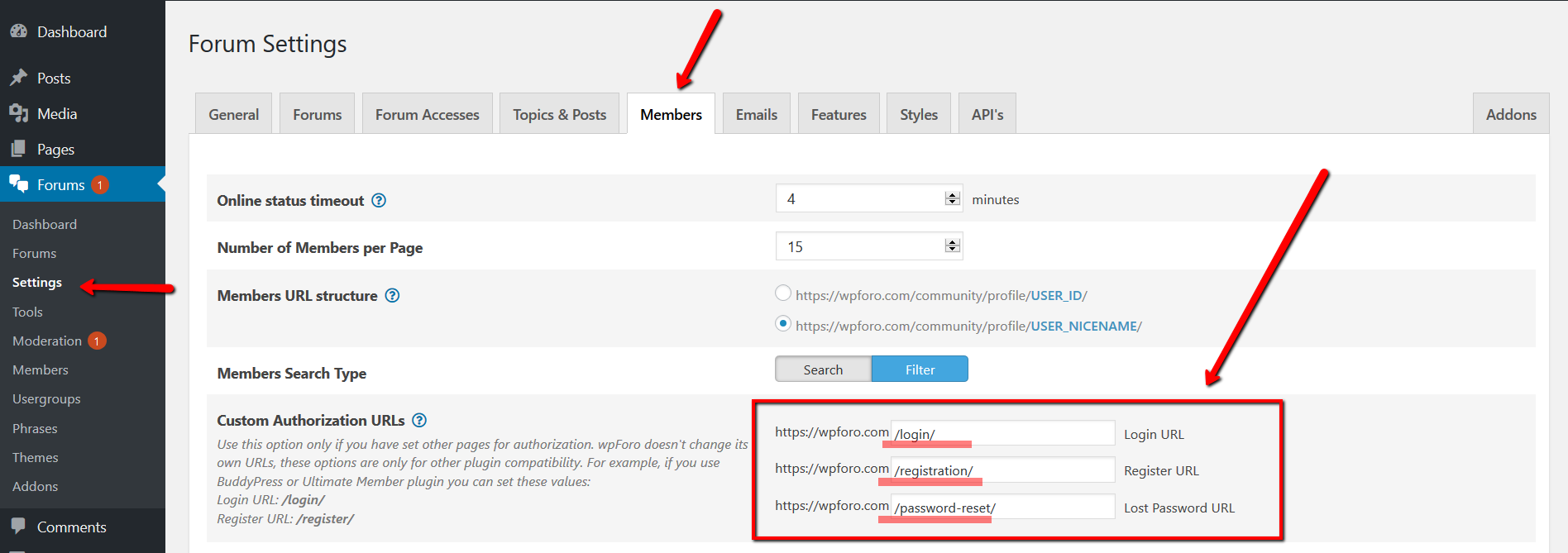
This is the correct way to change wpForo Login / Register and Reset Password Page URLs to other plugins according page URLs, such as Ultimate Members.