Hi there!
You have created a really good add-on, and I would like to work with gVectors in the future to purchase its extended functionality, but I have encountered a question that is causing me some confusion.
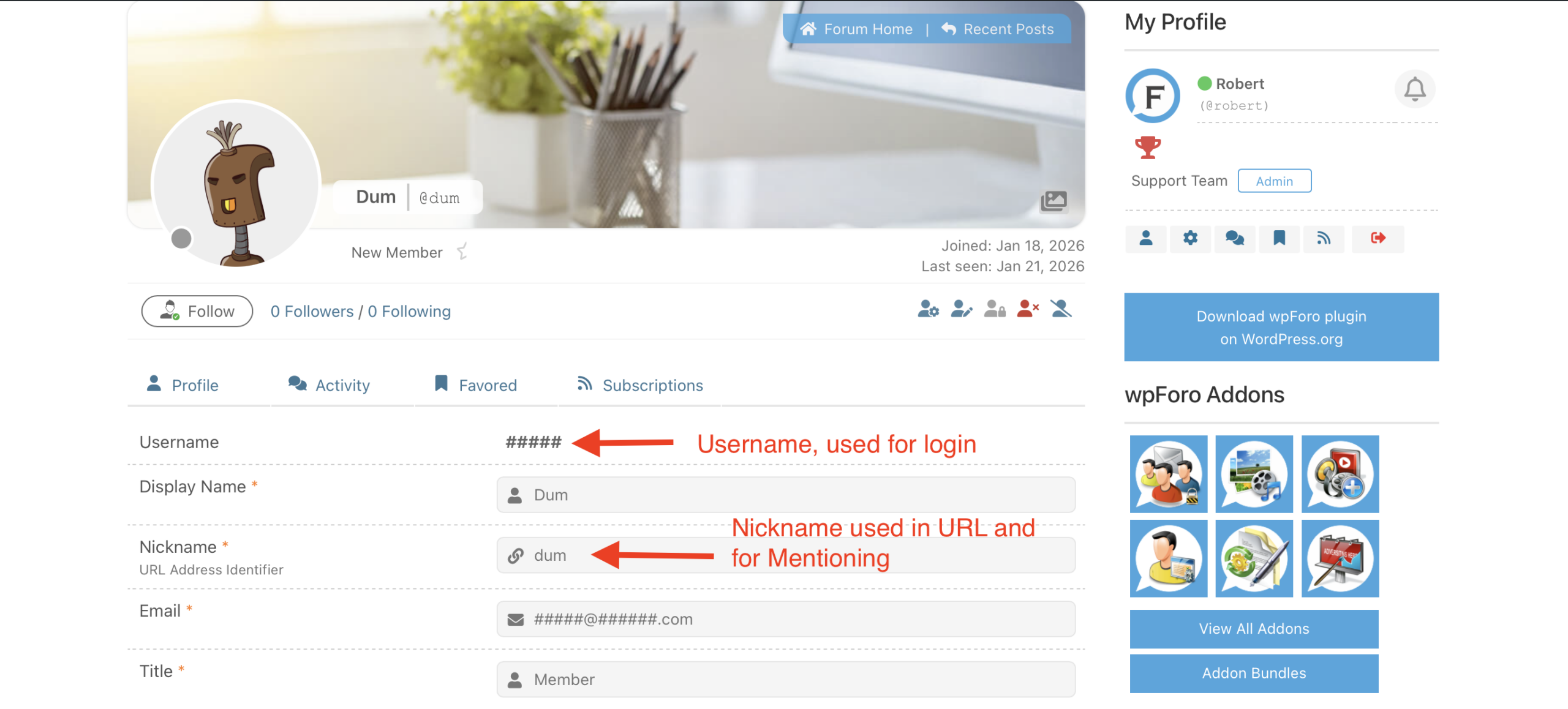
When registering on the forum, the user's Login is used by default as their Nickname.
In turn, the user's Nickname is used as the default URL Address Identifier.
For example: I registered on this forum with the username “Dum.” My nickname automatically became @dum.
Now, when you go to my profile page, the URL Identifier will be displayed in the address bar, which means that my Nickname will be displayed in the address bar and, consequently, my Login will also be displayed there.
In addition, my nickname and login will be displayed in the forum footer, in the “Our newest member” line.
I am attaching screenshots.
I am not allowed to change my Nickname after registration. This means that all users will still be able to find out my Login by simply going to my profile page, as my Login will be displayed in the address bar.
Okay! To avoid a similar situation on my forum, I added an additional “Nickname” field to the registration form so that users could immediately set a Nickname for themselves during registration that is different from their Login. But wpForo still sets a Nickname that's the same as the Login. And again, any user can see my Login in the address bar when they go to my profile page.
However, I encountered another problem.
Everything goes fine during registration. A new Nickname, which differs from the Login, is set directly in WordPress, but it is not set in wpForo.
Okay! I decide to check if I can change the user's nickname on the profile page in vpForo. I change the nickname and it changes in WordPress. Everything is fine.
Then I decide to check if I can change the forum user's Nickname using the WordPress dashboard. I change the Nickname in WordPress and... the Nickname does not change on the wpForo profile page.
I reread several times all the similar topics on your forum that I could find.
I cleared the cache as described here https://wpforo.com/community/how-to-and-troubleshooting-2/nicknames-cannot-be-modified/
I don't have any caching plugins installed.
I deleted user caches. I synchronized users, updated their statistics, and flushed permalinks. Nothing helped.
!! The reason why wpForo does not respond to nickname changes in the WordPress dashboard is as follows:
When changing the nickname in the WordPress panel, an entry is made in the table $wpdb->usermeta with the meta key "nickname".
In turn, when changing the nickname on the wpForo profile page, changes are made to the table $wpdb->users with the meta key "user_nicename".
WordPress table relations allow to replace the "nickname" metakey when the "user_nicename" metakey changes.
As a result, when changing the nickname in the WordPress dashboard, only the value of the usermeta table changes, while the users table retains the value set by wpForo.
In this thread, @robert says that
all WordPress plugins (e.g. BuddyPress) and even the WordPress use Nicknames in user profile URLs? So, please let me know if this is a security issue why thousands of plugins and the WordPress use the nickname in public places, in the user @mentioning and in User URLs? If you click on Article Author link on a regular WordPress article you'll go to WordPress user page. Just take a look on the URL, it consists of your nickname. So the nickname is already public, even disabling wpForo will not help you make nicknames private (unless you use custom solutions).
Indeed, nicknames are used for display in user URLs, and there is no problem with this, PROVIDED that the nickname is not equal to the Login.
This thread provides a good example of users mistakenly entering their email address in the “login” field, making it accessible to all other users.
Usually, when people register an account somewhere, they expect that their login will be known only to them and will not be displayed publicly. So, the fact that the email was displayed in the address bar in this case is definitely not a user error.
So yes, it's a real security vulnerability.
This raises several questions:
1.
Are you planning to change anything with the algorithms for displaying user URLs?
Although you claim that there are no problems with this, the forum has quite a lot of topics with complaints about the display of Logins in the address bar and requests to fix this. However, you have been ignoring this for several years. Do you really think that displaying the login in the address bar is normal?
Taking into account the changes that have occurred in legislation on the protection of rights, the described problem does not make wpFor attractive.
2.
Please tell me where I can find the function that is responsible for relationship nicknames on the vpForo user page with wpdb->users -> "user_nicename". And can I use this function to change this relationship to a relationship with $wpdb->usermeta -> "nickname". Since there is currently no other solution than to hide user logins from public access without using custom solutions. And then at least by adding a new field to the registration form, it will be possible to achieve the desired result.
3.
Or perhaps you can suggest another way to solve this issue that could be implemented now?
Thanks!